Select File
or drag and drop files here
The Challenge
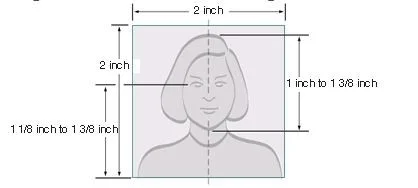
US passport, visa, green card, and DV lottery applications require identical 2×2 inch photos with head height 1–1⅜ inches (50-69% of frame). One wrong measurement = automatic rejection, resubmission fees, and weeks of delays.
One photo format for all US government ID applications
US government uses standardized 2×2 inch photos for passport books, passport cards, visa applications (B1/B2 tourist, work visas, student visas), permanent resident cards (green cards), employment authorization documents, and Diversity Visa lottery entries. Same dimensions, same specifications—create one compliant photo and use for multiple applications within 6-month validity period.
US photo ID requirements - will your photo be accepted?
- Taken within last 6 months
- 2×2 inches with head height 1–1⅜ inches (use guidelines)
- White or off-white background with no shadows
- Face centered, neutral expression, mouth closed
- Eyes open and fully visible (no hair covering)
- No glasses unless medical exemption with signed statement
- At least 600×600 pixels at 300 DPI for printing
- No filters, beauty mode, or digital alterations
Common rejection reasons - avoid these mistakes
- Head size outside 1–1⅜ inch range (most common rejection)
- Shadows on face or background visible
- Wearing glasses without medical documentation
- Photo older than 6 months
- Low resolution causing pixelation when printed
- Smiling with teeth showing
- Eyes closed or partially closed
- Background not white/off-white or has patterns
How to print US passport photos at home
- Paper: Use photo-quality paper (glossy or matte). State Department accepts both finishes.
- Printer settings: Select highest quality, 100% scale (no 'fit to page'), colour mode.
- Paper size: Choose 4R (4×6 inch) for 4 photos, or Letter/A4 for 6 photos.
- Cutting: Use sharp scissors or paper trimmer. Cut precisely along grey guide lines.
- Size verification: Final photos must measure exactly 2×2 inches. Use ruler to confirm.
- Alternative: No printer? Print at CVS ($14.99 for 2 photos), Walgreens ($14.99), Walmart ($7.44), Costco ($4.99), or local photo shop.
Taking passport photos of babies and infants
- Setup: Lay baby on white or off-white blanket on floor.
- Lighting: Natural window light or even overhead lighting. Avoid direct flash. No shadows on face or background.
- Position: Photograph from directly above with baby's face centered in frame.
- Requirements: Eyes open, mouth closed (remove pacifier). Support head if needed but keep hands out of frame.
- Timing: Take photos when baby is calm and alert. Multiple attempts normal—expect 10-20 shots for one compliant photo.
- Tip: Feeding schedule affects alertness. Try 30-60 minutes after feeding when baby is content but not sleepy.
Good vs bad US passport photo examples
Cost comparison: DIY vs photo services
- CVS Passport Photo Service: $14.99 for 2 photos (2024 prices)
- Walgreens: $14.99 for 2 photos
- Walmart: $7.44 for 2 photos
- Costco Photo Center: $4.99 for 2 photos (members only)
- Post Office passport photo service: $15-18 depending on location
- This tool: Free. Print at home for $0.25-0.50 per sheet (paper + ink cost)
- Savings: $5-15 per application. Family of four saves $20-60 using DIY approach.
Official US State Department Resources
Step-by-Step Workflow
Upload and Position
Select Enhancement
Download or Print
Specifications
- Photo Size
- 2×2 inches (51×51 mm)
- Resolution
- 600×600 pixels at 300 DPI
- Head Height
- 1–1⅜ inches (50-69% of frame)
- Background
- White or off-white, plain
- Recency
- Taken within last 6 months
- Expression
- Neutral, mouth closed, eyes open
- Valid For
- Passport, visa, green card, DV lottery
Best Practices
- Ensure even lighting with no shadows on face or background
- Face camera directly—no head tilting or turning
- Remove glasses unless medically required with documentation
- Position eyes between blue and green guidelines (use crop tool)
- Use Sharpened variant if photo is slightly soft or out of focus
- Print on photo-quality paper for best acceptance rate
- For online applications (passport renewal, DS-160 visa), download single photo as JPG
- For postal applications, print 4R sheet with multiple copies and cut along grey lines
Frequently Asked Questions
What are official US passport photo requirements?
Photos must be 2×2 inches, taken within last 6 months, with white/off-white background. Head height must be 1–1⅜ inches from chin to crown, face centered, neutral expression, mouth closed, both eyes open and visible.
Can I use same photo for passport, visa, and green card?
Yes. US passport, all visa types (B1/B2, work, student), green card (I-485), employment authorization (I-765), and DV lottery all use identical 2×2 inch specifications. One photo works for multiple applications if less than 6 months old.
Can I wear glasses in US passport photos?
No, unless medically required. If you have medical need, must provide signed statement from doctor. Even with exemption: no tinted lenses, no glare or reflection, frames must not cover eyes.
How recent must US passport photos be?
Within last 6 months to reflect current appearance. Longer validity than most countries (UK requires 1 month).
Can I smile in passport photo?
Neutral expression required, mouth closed. Natural slight smile acceptable but no teeth visible. Wide smiles cause automatic rejection.
How do I print passport photos at home?
Download print sheet, load photo-quality paper (4R or Letter size), print at 100% scale with no margins, highest quality setting. Cut along grey guide lines to get exact 2×2 inch photos. Verify size with ruler before submission.
Where can I print if I don't have printer?
CVS ($14.99), Walgreens ($14.99), Walmart ($7.44), Costco ($4.99, members only), local camera shops, or any photo printing service. Bring USB drive or email photo. Specify '2×2 passport photo' or provide dimensions.
Can I use this for visa applications?
Yes. All US visa applications (tourist B1/B2, work H1B/L1, student F1/J1, immigrant visas) use 2×2 inch specifications. Same photo works for DS-160 online applications and embassy submissions.
Related Guides
Canada Photo ID Tool - 50×70mm for Passport, Citizenship & PR Card
- 50×70 mm
- 2000×2800 pixels
- 31-36 mm (44-51%)
Japan Driving Licence Photo Tool - 24×30mm Format
- 24×30 mm
- 566×708 pixels at 600 DPI
- White
Ireland SPSV Driver/Taxi Licence Photo - 70×100mm Format
- 70×100 mm (7×10 cm)
- 827×1181 pixels at 300 DPI
- 50-60 mm (50-60% of frame)
India PAN Card Photo Tool – 25×35mm Format for NSDL & UTIITSL
- 25×35 mm (width × height)
- 590×826 pixels, JPEG, under 50KB
- 213×213 pixels, JPEG, under 30KB
Croatia Photo ID Tool – 35×45mm for Passport, Visa & Osobna Iskaznica
- 35×45 mm (3.5×4.5 cm)
- 827×1063 pixels at 600 DPI
- 31.5–36 mm (70–80% of frame)
Italy Visa & ID Card Photo Tool – 35×45mm Schengen/CIE Format
- 35×45 mm (EU/Schengen standard)
- 827×1063 pixels at 600 DPI
- 70–80% of photo area
Czech Republic Visa & ID Photo Tool — 35×45mm Standard Format
- 35×45 mm
- 826×1063 pixels at 600 DPI
- Eyes-to-chin minimum 13mm
Australia Taxi/Private Hire Vehicle ID Card Photo - 65×65mm Format
- 65×65 mm (square format)
- 1535×1535 pixels at 600 DPI
- Approximately 45-52 mm (69-80% of frame)
Albania Passport Photo Tool - 40×50mm Official Format
- 40×50 mm
- 944×1181 pixels at 600 DPI
- 32-36 mm (64-72% of frame)
Bangladesh Passport Photo Tool - 45×55mm Official Format
- 45×55 mm (4.5×5.5 cm)
- 1063×1299 pixels at 600 DPI
- 70-80% of photo height (38-44 mm)
Belarus Passport Photo Tool - 40×50mm with Grey Background
- 40×50 mm
- 944×1181 pixels at 600 DPI
- 32-36 mm (64-72% of frame)
Belgium Passport & Visa Photo Tool — 35×45mm ICAO Biometric Format
- 35×45 mm
- 826×1063 pixels at 600 DPI (400 DPI minimum)
- 31-36 mm (70-80% of frame)
Brazil Passport Photo Tool - 35×45mm Official Format
- 35×45 mm
- 413×531 pixels
- 600 DPI
Bulgaria Passport & Visa Photo Tool — 35×45mm Biometric Format
- 35×45 mm
- 826×1063 pixels at 600 DPI
- 25-35 mm (chin to crown)
Cambodia Passport Photo Tool — 40×60mm Official Biometric Format
- 40×60 mm (4×6 cm)
- 945×1417 pixels at 600 DPI
- 36 mm (chin to top of hair, 60% of frame)
Chile Passport Photo Tool - 45×45mm Square Biometric Format
- 45×45 mm (square format)
- 1063×1063 pixels at 600 DPI
- 27 mm (60% of frame)
Colombia Passport & Cédula Photo Tool — 4×5cm Official Format
- 4×5 cm (40×50 mm)
- 945×1181 pixels at 600 DPI
- ~27 mm (chin to crown)
Republic of Congo (Brazzaville) Passport & Visa Photo – 40×40mm CEMAC Format
- 40×40 mm (4×4 cm) – square format
- 944×944 pixels at 600 DPI
- 28–32 mm (70–80% of frame)
Cyprus Passport Photo Tool - 40×50mm Biometric Format
- 40×50 mm
- 944×1181 pixels at 600 DPI
- Minimum 34 mm (68%+ of frame)
Czech Republic Passport Photo Tool — 50×50mm Embassy Format
- 50×50 mm (5×5 cm)
- 1181×1181 pixels at 600 DPI
- 32-36 mm (64-72% of frame)